Scale labels: how the till reads a variable-weight barcode
What the 13 digits on a scale label mean, why the till sometimes charges a different amount, and what to check before you open with a new scale.
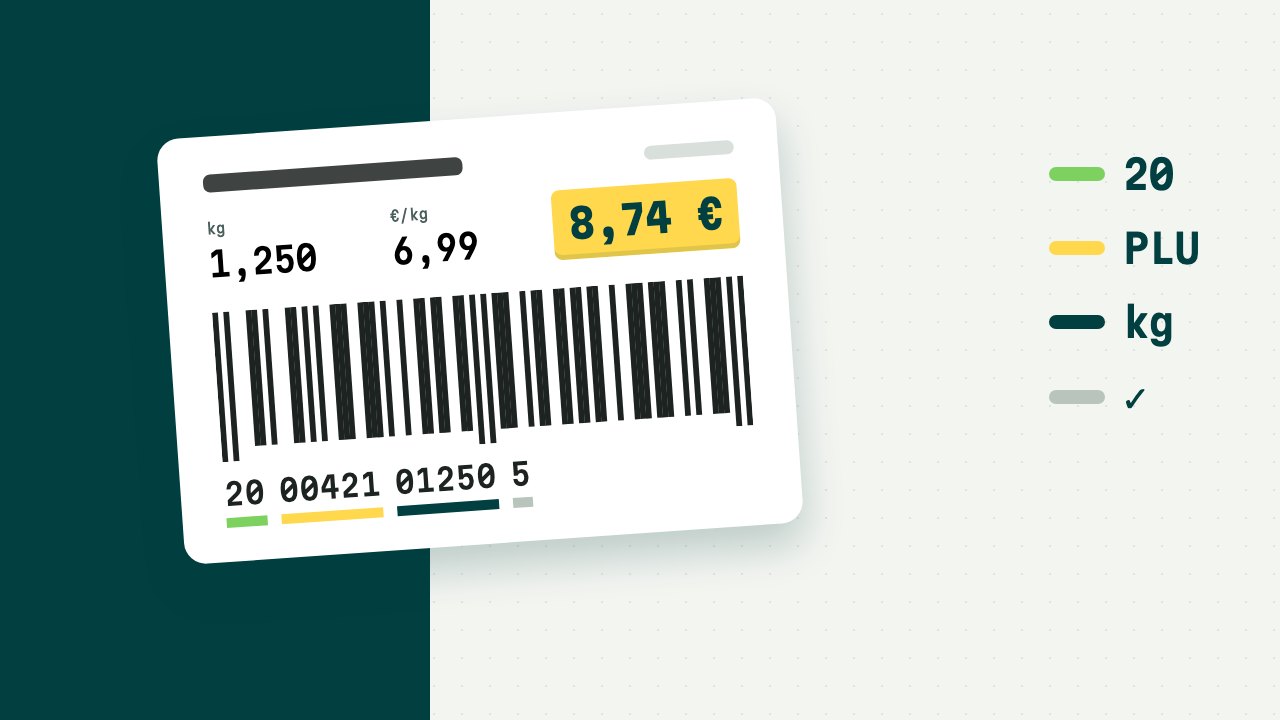
When a customer puts a tray of chicken breasts with a scale label on the belt, the till doesn't weigh anything. It reads a 13-digit barcode and turns it into a product, a weight and an amount. If it reads it wrong, the customer pays something different from what the label said, and you usually find out with a queue behind them.
This post explains how that barcode is built, where the mistakes usually come from and what to check when you change scales or POS.
What's inside a variable-weight label
A branded packaged product carries a GTIN, a number that identifies the same item anywhere in the world. Meat, fruit or cheese weighed in store can't carry one, because every tray has its own weight and price.
For this, GS1 (the organisation that manages barcodes) reserves prefixes 02 and 20 to 29 for restricted circulation numbers. They only mean something inside one store or one country, they don't identify a product globally, and each national GS1 organisation decides how they are used.
Supermarket scales very often use this layout:
| Digits | Example | Meaning |
|---|---|---|
| 1-2, prefix | 20 | This is a scale label |
| 3-7, item (PLU) | 00421 | Chicken breast |
| 8-12, weight or amount | 01250 | 1.250 kg (or €12.50) |
| 13, check digit | 5 | Catches misreads |
So 2000421012505 reads as "item 421, 1.250 kg". But there is no single format. Depending on the scale and its settings, the prefix changes, the item code can be 4, 5 or 6 digits, and the last block can hold weight or amount. The till has to know your scale's exact format.
Weight or amount: know how each one fails
If the label holds the weight, the till multiplies it by the price per kilo on file. If it holds the amount, the till charges what the label says.
Both work, but they fail differently:
- With weight on the label, one price change that reached the POS but not the scale (or the other way round) is enough for the label to say €8.74 while the till charges €9.12.
- With the amount on the label, the till charges what the customer saw. But if the item has no price per kilo on file, stock can't tell how many kilos left the shop.
Our view is that the label is what the customer accepted when they picked up the tray. The till should charge that and work out the weight for inventory behind the scenes.
The five most common mistakes
- Wrong format. The till expects a 5-digit PLU and the scale prints 6. You get "product not found" or, worse, a different product.
- PLU missing on the POS. The item exists on the scale, but nobody created it on the till with the same code.
- Prices out of sync. The beef price changes on the POS on Monday and the scale still has last week's.
- Grams or kilos.
01250can be 1,250 g or 12.50 kg depending on the decimals in the format. - Total rounding. If the till adds unrounded amounts and rounds at the end, the total can be a cent off the sum of the receipt lines. Round each line to the cent before adding.
What to check when you install a new scale
Before you open with it, test five or six real products:
- Print a label for each one and scan it at the till.
- Compare the label's weight, price per kilo and amount with the receipt line.
- Scan two trays of the same product. They should show as two lines, because they are two packs with their own weight.
- Change a price on the POS and check it reaches the scale before the next label.
If something doesn't match, the cause is almost always the format definition, not the scanner.
How Salut handles it
In Salut, each store defines its label format: prefix, item code position, whether the last block is weight or amount, units and check digit. The 20 CCCCC WWWWW format comes set up out of the box.
When it reads a label, the till charges the amount the customer saw printed, even if the price on file changed later. If the label has no weight, Salut works it out from the amount and the price per kilo so stock adds up, and marks it as a calculated weight. Every scanned label is its own receipt line, and each line is rounded before the total is added up.
For loose items without a label, the till also reads the weight straight from a connected scale. You can see compatible scales under Hardware.
Sources
- GS1, General Specifications: prefixes 02 and 20-29 for restricted circulation numbers.
- GS1, Fresh Foods Sold at Point-of-Sale Implementation Guideline: barcodes for variable-measure items at the point of sale.